Tuesday, January 27, 2015

Forum assistance: Improvements to Pre-Book Links

Thanks to suggestions from users we've already made some big improvements to our new pre-book links feature, which was just released yesterday.

To summarize this feature, it allows you to enter a reservation internally and then provide a link to your guests that they can use to go to your Reservation Page to fill in their details and confirm the reservation. The room prices and rooms will already be selected.

The improvements are:

  1. No longer necessary to create complicated links yourself.

  2. Easily access the various links from the "More" menu in the Reservation Details screen.


  3. The room(s) and dates will be pre-selected when the guest opens the link. All they need to do is fill out the Contact and Payment details.

  4. - This applies to all of our booking pages, except at this time, the hotel style pages.


  5. New merge codes to access the booking links.

  6. - Build an email template using our new merge codes:
    {{bookinglink}} - link to multiple units or single units page
    {{bookinglink_calendar}} - link to calendar version page (if it exists as part of the reservation page specified to be used for the reservation).
    - This makes it easy to create an "inquiry" reservation and then send off an email template which contains the link to the booking page.


The Reservation Page that will be used for the above links is the page that is set in the Reservation Page Settings as the one to be used internally,


OR

one that you specify, if you have enabled the feature to be able to do so.

In Settings tab, Preferences:


Future Enhancements


We are considering:
- any information typed into the guest details in the "inquiry" reservation will populate the contact form when the guest clicks through to the Reservation Page
- a way to be able to use this feature with reservations that block the calendar
- extending this functionality to hotel style pages
- a Copy button on the links box

Monday, January 26, 2015

Forum assistance: Prebook Guests and Send a Link to Collect Reservation Details/Payment

Now it is possible to create a reservation internally, adjust the room prices, and then email the guest a link to be used for entering their contact information and payment.

This makes it easy to negotiate a price over the phone or email, and then provide your guest with a link to your reservation page which has the negotiated room price.

In order to do this:
1. Make a reservation internally and adjust the room prices.
2. Set the reservation to a status which does NOT block the calendar.
3. Construct the link to use to email the guest:

Add the string "/idr|99999999" to the end of your reservation page URL (this feature is currently supported in our Multiple Units pages, both Calendar Mode and Availability Search Mode, and in our Single Unit Pages).

Make sure to replace "99999999" with the reservation ID from the reservation created in Step 1.

This will cause the reservation page to load with the pre-negotiated rates loaded for the unit and dates saved with the internal reservation.

The reservation created in Step 1 above is just a place holder reservation. A new reservation will be created when the guest books. This could be convenient if you wanted to send the same link to multiple inquiries, and the guest that books first would be the one to lock in the reservation.

Some example links:
https://v2.reservationkey.com/thompson/1089/s|2.1.2015|2.4.2015|85:0/idr|945617
- single unit page
- has dates and unit pre-selected

https://v2.reservationkey.com/thompson/byi/idr|945617
- multiple units, date search mode
- dates not pre-entered

https://v2.reservationkey.com/thompson/byi/s|2.1.2015|2.3.2015/idr|945617
- multiple units, date search mode
- dates pre-entered

https://v2.reservationkey.com/thompson/byi/c/idr|945617
- calendar search mode, dates not pre-filled

https://v2.reservationkey.com/thompson/byi/c|2.1.2015/idr|945617
- calendar search mode, dates pre-filled


In these examples the regular price is $100 per night, but we changed the price to $10 per night for a few nights:


Friday, January 23, 2015

Forum assistance: Now Specify Number of Children Per Room

Now it is possible on a room by room basis to exactly set the number of occupants allowed, including how many are allowed to be children.

This can be set from zero up to the total number of occupants allowed. If the number of children allowed in the room/unit is set to zero then the children drop down option is not visible for that room/unit on the Reservation Page.

This enhancement has been applied across all of our Reservation Page types (multiple units, single unit, calendar search mode, hotel style pages) and can be set in the individual unit settings as well as in the build add/edit pages.


Wednesday, January 21, 2015

Forum assistance: ReservationKey Change Log Added

There is always lots going on in ReservationKey, new features, enhancements, bug fixes, etc. But knowing what is happening in the system has been difficult. So now we've created a change log where we post very brief summaries of all changes, with links to related forum posts for further details.

This way, you can just periodically check the Change Log when you want to get up to speed with the most recent changes in the system.

The Log can be accessed from the menu icon in the upper right corner of the system.


Friday, December 12, 2014

New Responsive Design for Reservation Details

We've rewritten the underlying code for the Reservation Details page so that it is now uses a responsive layout rather than a fixed layout. This means that the layout of the page will automatically change based on the user's device screen size. Instead of being a fixed width of 1000 pixels, now the elements on the screen will re-position themselves to best fit whichever size screen is being used. As we see more and more mobile devices being used, often with smaller screens than for what the system was originally designed for, it is important that we rework the layout of our screens so that the system is also easy to use on small screens.

When viewed full screen on a "desktop" computer the layout should mostly look the same. But when the screen is made much narrower, what was traditionally in the right side column now moves below the left column and the entire page is one long column.

If things don't look quite right at first, press Ctrl-R or reload the system in order to make sure you are seeing the newest files we have loaded. This has been tested on a variety of browsers and devices, but sometimes things still don't look right. If you notice anything unusual feel free to comment here (and post a screenshot if possible).

Full Screen:


Narrow Screen:


Friday, December 5, 2014

A Couple New Permissions Settings

It is now possible to set which links appear in the header section of the system on a user by user basis.

Go to Settings, Users, click on a user, and then scroll to near the bottom and expand the Additional Settings area.


Then select whether to show or hide the Search link, Reminders icon, or Number of New Reservations link.


An example of the Reminders and New Reservations links turns off:

Wednesday, December 3, 2014

Payment Pages now include terms agreement section

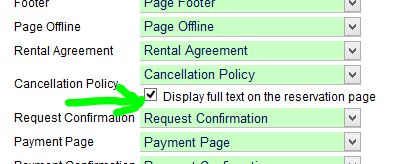
The same functionality as is found on the main reservation page with regard to the terms and cancellation policy now applies to the payment pages. If you are using our {{paymentlink}} feature, or taking payment on the confirmation page, now the terms and conditions and cancellation policies and links will appear there. This was done in response to credit card policies requiring the cancellation policy to be shown on any page where a guest is agreeing to make a payment.


If checked to show full text on the page in the Reservation Page settings, then the full text also shows on the payment page.


Wednesday, November 26, 2014

New Authorize Only, Void, Capture options for authorize.net and RentPayment

Thanks to user requests and suggestions, we have added an option for Authorize Only for credit cards being processed by Authorize.net and RentPayment (Yapstone). This allows you to verify the card is still valid by putting a hold on funds (authorize only). The hold can later be voided, or a charge can be created, up to the amount of the prior authorization.

This feature is used by clicking the Authorize Only button after entering the amount you want to authorize.


When successful, the authorized amount appears in the log of payments below (but does not affect the amount actually paid):


To charge the prior authorized amount, click the blue "Charge..." button.

Then verify the amount you want to charge (up the full amount of the previously authorized amount) and click Charge Card.


To cancel a previously authorized amount click the Void link.

Thursday, August 14, 2014

Enhancement: Bulk Print Now Can Create and Email PDFs

Thanks to an idea from one of our users, we've added an enhancement to our bulk print section so that you can now create a PDF file which can be printed or emailed.

One reason for this is to make it easier to take electronic signatures on registration forms. What this user has done is:

1. Created a registration template in ReservationKey (website tab, email templates).
2. On a regular basis he emails these PDF documents to himself to use with Signeasy by Apple.
3. He clicks "open with SignEasy" in his email account.
4. The guest signs the document on an ipad at the front desk when they arrive.
5. The document is automatically stored in the Signeasy cloud.


The Bulk Print option is found in the lower right corner of the main internal Availability screen:


Select the date range, template, etc., and then click Create PDF:


You can have the system email the PDF as an attachment, or if no email is set it will make a link where you can click to download the PDF.


Wednesday, July 9, 2014

NEW: Automatically track commissions due from myallocator.com bookings

If you are using our channel manager connection, myallocator.com, it is now possible to track commissions owed on reservations that come into ReservationKey through the channel manager. We've created a place in the channel manager setting to save how much commission is paid on each reservation you receive through third parties (OTAs). Once this is set, we automatically calculate and store in the expenses section of each reservation the commission amount. This makes it possible to run our existing expense reports and see totals by vendor, by date, etc. Since each OTA is listed as a separate vendor, this is also a great way to track how many reservatoins are coming in from each of the channels you market on.

Step by step instructions:

1. Settings Tab, External Connections, Edit
2.. Enter the amount you pay as commission on each reservation. Click Save.

.

3. Now you will see a commission entry in the expense section:


4. And also in the Vendor reports. For example:


If you haven't yet started working with Online Travel Agents (OTAs such as booking.com), you may want to consider it. We've only been hearing good tings about it. Recently one of our users emailed me this information about how it has helped his business.

"I am setting up the Bard's Inn on booking.com now. Airb&b finally is now syncing with myallocator so I do not need to do it manually. I have taken $1800 in AirB&B reservations since I set it up at the start of the year. That is not huge but still was a pleasant surprise because as i get more good reviews, I get more reservations.

The first 6 months of 2013 I had 355 room nights.
The first 6 months of 2014 I had 497 room nights which is 147 nights more directly linked to myallocator. That is a 41% increase."

So, if you haven't yet signed up with myallocator, we strongly encourage to you consider it. Set up the connection in ReservationKey under Settings, External Connections. ..

Thursday, May 15, 2014

Drag Across Dates to Select Multiple Days

We added an enhancement to make it easier to select dates on the internal calendar. Now, instead of clicking each day one by one, we have the option to click the first date, hold down your mouse, and then release on the last date of the reservation. This will select all dates in between, as seen here:


It is also possible to select two units at a time this way. The unit where you start the click will be selected, as well as the unit where the mouse is released, such as seen here:

Monday, May 12, 2014

Innrewards.com - new directory site created by ReservationKey users

Several of our long time users have been working hard to create a new directory website for independent lodging facilities, innrewards.com. The idea with this is to provide a central place for guests to find properties and avoid paying commissions to the big Online Travel Agent sites. ReservationKey has worked with innrewards.com to provide a way for availability in our system to update their website. This means that their website pulls availability directly from ReservationKey for their users that also use ReservationKey.

It is free to list on innrewards.com, so why not take advantage of this extra advertising opportunity? To get started just register for an account on innrewards. Then, to make the connection between ReservationKey and Innrewards, just go to the Settings Tab, External Connections. To start with we are using the same connection as we build for TripAdvisor, so add the connection for TripAdvisor. In the future we likely will build a dedicated Innrewards setup area, but for now this was the quicker way of being able to roll this out.

Once this is completed you should be able to start seeing your property's real time availability start showing up on innrewards.com .

Wednesday, May 7, 2014

Review of Forum Updates

We've been working hard to make the forum more functional, especially to help with organizing and prioritizing requests that we receive. We now are sorting all messages into one of three categories - Technical Support, Feature Request, and Bug Reports. And from there we are connecting the post with the area of ReservationKey it is related to. Already this has been extremely helpful in allowing us to have a better idea of which parts of the program are the source of the most questions, which in turn helps us to determines where we can best spend our resources improving the system.

This also should help our users since now it is much easier to find prior forum posts related to the section of the system one may have a question about. In fact, as part of the process of posting a new post we show a list of prior related posts. We hope that if the issue was previously discussed, the person that currently has a similar question may find immediate assistance, without having to post a new question and wait for a response.


Also, it is easy to find posts related to a section by using the new "By Section" search option:


Or, simply click any tag to retrieve a list of all matching posts. The status is also clickable, which makes it easy to review completed projects, in progress, etc.


A completely new section of the forum is the Statistics area. This is useful for seeing which parts of the system have the most number of posts, and how many posts are made per day, per month, etc. Here we can quickly spot trends in the use of the forum (such as Thursdays seem to be the busiest day), and which section of the system generates the most posts (for Technical Support, Reservation pages in the most recent 30 days). We can see overall statistics or broken down by type of post.


This new organization is already helping us to be much more efficient in answer questions, and to be better organized in keeping track of feature requests and bug reports. We hope you find these features as useful as we do.

Friday, April 18, 2014

Update Themes

We've update our "Simple" themes to reflect trends in modern web design. Most noticeable are some brighter colors, larger text, and larger form fields. But we've also added responsive design into these themes, meaning that the page formatting automatically adjusts to fit the user's screen, no matter what size. This means it isn't critical to have a separate theme for mobile devices and web. Instead it is possible to just use one self-adjusting theme that can work across all devices.

These themes are:

Simple 2014
Simple, Reversed 2014
Simple, Narrow 2014

In full screen (such as on a desktop browser) the system shows two columns side by side.


On narrower screens, such as a phone, the system becomes one column. Images automatically resize to be narrowed, as necessary.

Saturday, March 22, 2014

New MyAllocator Option for Room Type Matching

For users that are taking advantage of our connection with our channel manager partner, myallocator.com, we now have two ways to set up matching between ReservationKey and Myallocator.

By Room Type
We've just added the option to match room types in ReservationKey to those set up in Myallocator. With this method you don't need to set up one room in Myallocator for every room you have listed in ReservationKey. Instead, just set up your room types to match between the two systems. This makes it much faster to set up for larger properties, or those that have many units of similar types. Reservations made through your channels will be placed into the next available room of the type selected by the guest.

One to One (Room to Room)
The is the original way. Set up one room type in Myallocator for every room you have in ReservationKey. And in Myallocator set the number available for each type to be one. Allows for more specific control of which rooms reservations are placed into.


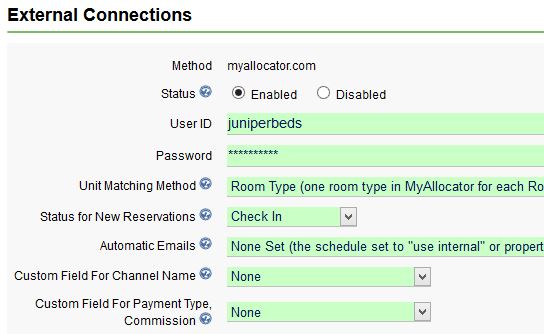
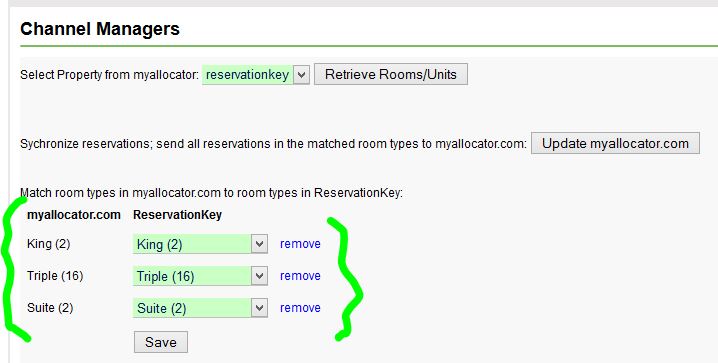
To set up matching by room type, go to Settings Tab, External Connections, Edit Myallocator settings. And select Unit Matching Method of Room Type.


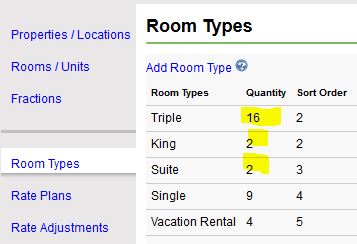
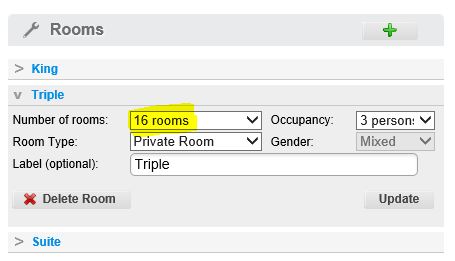
You should have already set up Room Types in ReservationKey and matched them to all your rooms/units.


And you should have done the same in Myallocator.


The quantity of types in both systems should match.

Do the actual matching by going to Edit Room/Unit settings in the External Connections section.


Once you have saved your matched room you can click the button "Update myallocator.com" in order to send a full sync to their system.

Now, whenever a reservation is created in ReservationKey, or through one of your OTA (Online Travel Agent) channels that is connected to Myallocator, all systems will stay in sync.

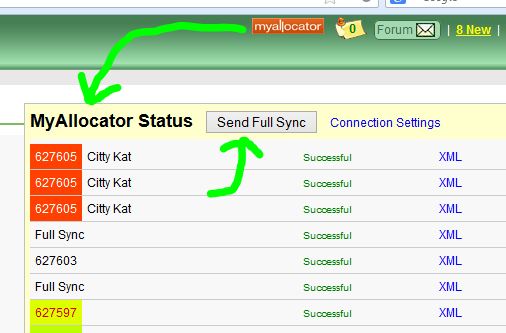
We have also made it easier to send a full sync whenever you want, by including this option in our Myallocator status window.


With matching by room type we send full syncs more often. For example, whenever reservations are deleted we send a full sync. You can monitor what is being sent by checking the status window (by clicking the Myallocator logo as seen in the above screenshot).

We hope this will make it even easier for our users to add channel management functionality to their accounts. Of course, we welcome feedback about this new method.

Thursday, February 27, 2014

MyAllocator Modifications

We've now added the ability to process modifications to existing reservations sent to ReservationKey from MyAllocator.

How this works is we set the prior version of the reservation to cancelled and then insert the modification as if we were inserting a new reservation. If the ReservationKey account doesn't contain a status that doesn't block the calendar (such as cancelled) the system will create one. We considered just deleting the old reservation but that didn't seem like a good idea since it may have been possible that some custom notes or other information were added to the reservation that shouldn't be deleted. We also considered just changing the rooms/units associated with the original reservation, but that also seemed difficult since we wouldn't always know what to change, and there wouldn't be a good record of the differences between the modifications.

In order to make this work we are now saving the version number with the reservation as it comes in from MyAllocator (this isn't visible to the end user). If the same version and MyAllocator ID already exists in ReservationKey we don't do anything (in order to avoid entering duplicate reservations, in case the reservation gets posted to our system multiple times for any reason). If the data being submitted is a different version than what already exists in ReservatoinKey, we change the existing version(s) to cancelled and then insert the new version as if it were a new reservation. If for any reason the new reservation dates are already blocked in ReservationKey the system will email the ReservationKey user a warning that the reservation was unable to be entered.

So, here is how it would look.

1. Original reservation.


2. First modification moves the date one day; original reservation cancelled (shows as a 1) and new reservation is entered.


3. Second modification changes the reservation from one day to two days.


This should help keep things in much better sync with regard to modifications. We suggest that you carefully monitor your incoming reservations from MyAllocator and check ReservationKey, at least for awhile, so you can verify that everything is working as expected.

Thanks to all our MyAllocator users for your help with our continued development with this functionality between ReservationKey and MyAllocator.